
Marketplace overview
The Marketplace is where your account can subscribe to bundles - packaged sets of skills, knowledge, and content built by curators and TrainAR's platform team.
The Marketplace is where your account can subscribe to bundles - packaged sets of skills, knowledge, and content built by curators and TrainAR's platform team.
Subscribing to a bundle unlocks its contents for your seats. Skills in the bundle become available to the AI assistant on the glasses. Knowledge in the bundle becomes searchable in trainee sessions. Procedures in the bundle appear in your team's training catalogue.
What's in a bundle
A bundle can contain any combination of:
- Skills - tools the AI assistant calls during sessions (e.g. parts lookups, manual page renderers, custom data fetchers).
- Knowledge - documents (manuals, specs, procedures) that the AI can search inside trainee sessions.
- Procedures - pre-built training procedures your team can follow without recording their own from scratch.
Some bundles are heavy on one - Parts & Spares is mostly skills + a curated parts catalogue. Other bundles might lean toward procedures (a manufacturer's full installation curriculum). The bundle card on the Marketplace tells you what's inside.
Where bundles come from
Bundles are published by either TrainAR's platform team or by approved third-party domain experts (manufacturers, trade trainers, senior engineers). Whichever the source, from your account's side a bundle is a bundle - subscribe, allocate to seats, use.
Bundles are subscription-based - you pay per seat per month for as long as you keep the subscription active. Cancelling stops billing immediately; existing session history is preserved but new sessions stop having the bundle's skills + content available.
Browsing the Marketplace
- Dashboard → Marketplace.
- Use the search bar to find a specific bundle, or sort with the top-right pills: Featured / Price ↑ / Price ↓ / Newest.
- The page is split into My Bundles (subscriptions you've activated) and Available Bundles (everything else live on the platform).
- Click any bundle card to see the detail page - full list of skills, knowledge sources, sample procedures, and the bundle's curator.
- Click Subscribe to start.
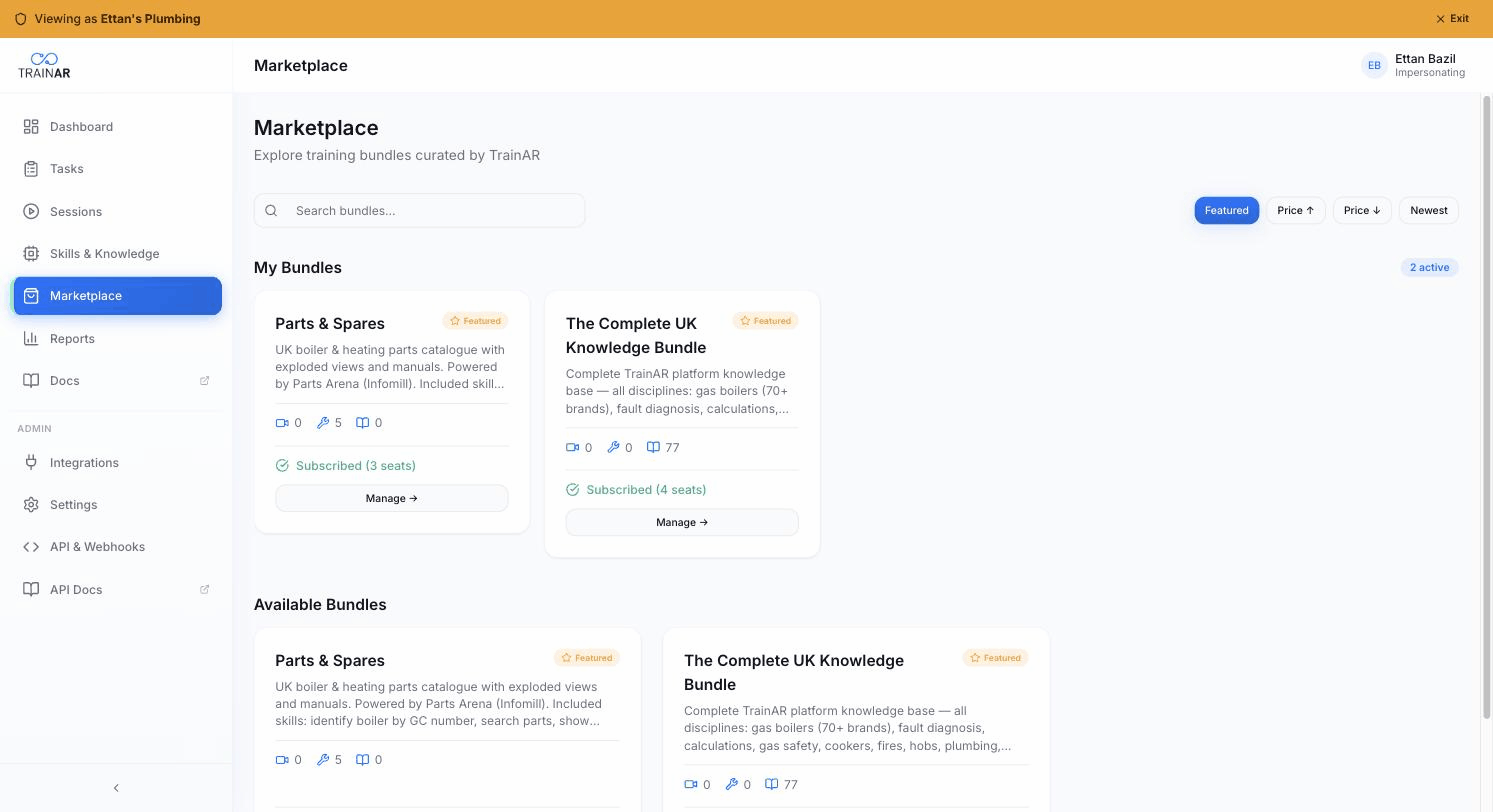
Bundle cards show three at-a-glance counts: video clips / skills / knowledge items the bundle ships. Currently live: Parts & Spares (UK boiler & heating parts via Parts Arena, 5 skills) and The Complete UK Knowledge Bundle (77 knowledge items covering gas, plumbing, fault diagnosis, calculations).
The Marketplace also flags any prerequisites the bundle has. For example, some bundles require a specific integration to be connected first (a parts-catalogue bundle might need a job-management integration so the AI has job context to draw on).
What you'll see in your account after subscribing
After subscribing to a bundle:
- Dashboard → Integrations may show a new tile if the bundle ships an integration (Parts & Spares adds a Parts Arena tile).
- Skills & Knowledge → Skills shows the bundle's skills under a separate section - read-only, since the bundle owns them.
- Skills & Knowledge → Knowledge → MCP Tools shows any MCP tools the bundle adds.
- The AI assistant on the glasses gets the new skills + knowledge in the next session - no glasses-side configuration needed.
Allocating to seats
Bundle subscriptions are per-seat. You choose how many seats can use a given bundle when you subscribe, and you can change the allocation later from the bundle's detail page in the Marketplace.
If you subscribe to a bundle for 5 seats and you've got 20 active seats, only the 5 you've allocated will see the bundle's skills + content. The others continue to use just the base platform + any other bundles you've allocated to them.
Cancelling
From the bundle detail page in the Marketplace, click Cancel subscription. Billing stops at the end of the current billing period. The bundle's content stays usable through the end of that period; after that, the skills disappear from your seats' AI assistant and the knowledge stops being searchable.
Session history doesn't disappear - recordings, procedures captured, AI summaries all remain. You just lose forward access to the bundle's content.
Where to next
- Subscribing to a bundle - the subscribe flow in detail.
- Parts & Spares bundle - the live platform bundle for UK boiler + heating engineers.