
Integrations overview
TrainAR connects to the tools your office and field engineers already use, so training fits into your existing workflow instead of becoming another system to manage.
TrainAR connects to the tools your office and field engineers already use, so training fits into your existing workflow instead of becoming another system to manage.
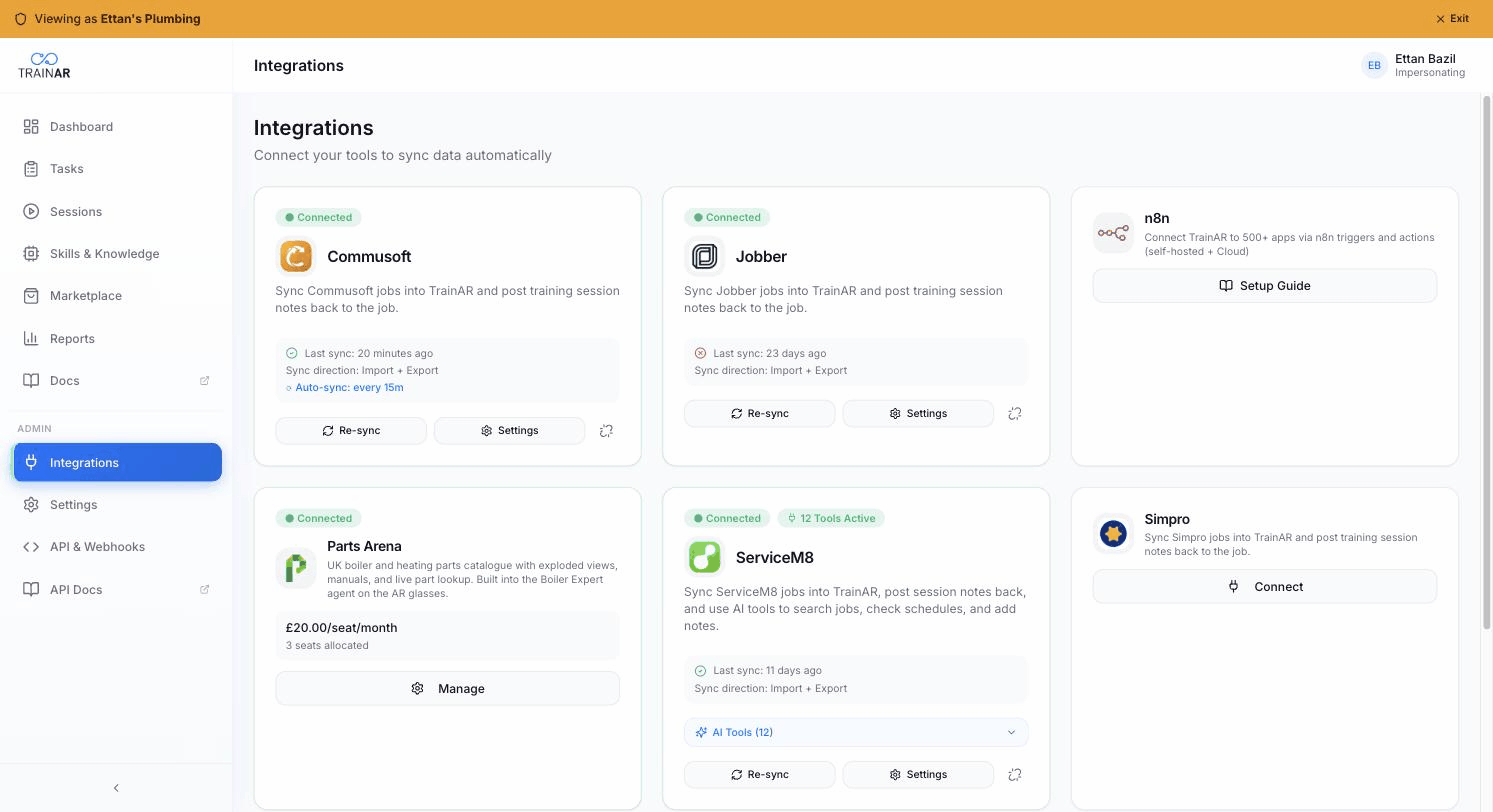
There are three families of integration: job-management integrations pull live work from your field-service platform into TrainAR as tasks (and write training completion notes back), automation integrations let you wire TrainAR events into any tool you like, and communication integrations give the AI assistant hands-free tools to send SMS and email during a session (the Agent Toolbox).
What's available today
| Integration | Type | What it does |
|---|---|---|
| ServiceM8 | Job management | Two-way sync of jobs + diary notes. Real-time webhooks. |
| Jobber | Job management | Two-way sync of jobs + visit notes. Real-time webhooks. |
| Commusoft | Job management | Two-way sync of jobs + communication notes. 15-minute polling. |
| Simpro | Job management | Two-way sync of jobs + job-timeline notes. Webhooks + 15-minute polling. Hands-free AI job tools. |
| BigChange | Job management | Two-way sync of jobs + job notes. 15-minute polling. |
| Payaca | Job management | Scheduled visits sync as tasks in real time. Notes + form PDFs back to the project. Hands-free AI job tools. |
| Powered Now | Job management | Rolling out - two-way job sync via webhooks. Notes + form PDFs back to the job. Hands-free AI job tools. |
| Zapier | Automation | Trigger Zaps from TrainAR events. 7,000+ apps. |
| n8n | Automation | Community node for self-hosted n8n. Triggers + actions across Task, User, Skill. |
| Twilio | Communication | Send SMS by voice from your own Twilio number (Agent Toolbox). |
| Resend | Communication | Send email with attachments from your own verified domain (Agent Toolbox). |
| Build your own | Custom | TrainAR webhooks + the TrainAR REST API. |
How job-management integrations work
When you connect a job-management platform, TrainAR does four things:
- Imports your active jobs as tasks. Each job becomes a task in TrainAR, carrying the title, description, due date, status, and assignee. Status mapping is handled automatically.
- Keeps tasks in sync as your jobs change. When status, assignment, or scheduling changes in your FSM, the linked task updates within seconds (webhooks) or 15 minutes (polling).
- Writes training completion back. When an engineer completes a training session against a task, TrainAR posts a note back to the originating job with the session summary, score, duration, and a link to the recording. On platforms that accept file attachments (Payaca, Powered Now), completed session form PDFs are attached to the job too. Your dispatcher sees that the training happened - without you remembering to log it. Writeback never changes the job's own status - what happens to the job stays your team's call, in your FSM.
- Gives the AI assistant hands-free tools (supported platforms). For platforms that support it, the connection hands TrainAR's AI assistant a set of tools to work the job by voice - look up the job, customer, parts and assets, and add notes, photos and forms back to the job. See the integration's own page for what its assistant tools cover.
You control the sync direction per integration in Settings → Sync direction: Import (one-way) or Import + Export (two-way - Export is the writeback). To stop a connection entirely, use Disconnect.
How automation integrations work
Automation integrations don't sync tasks - they let you treat TrainAR as a trigger and action source for any workflow.
- Triggers: TrainAR fires events (
task.created,session.completed,skill.executed, etc.) over webhooks. Your Zapier Zap or n8n workflow listens and reacts. - Actions: From n8n, you can create tasks, invite users, and execute skills inside TrainAR as part of a larger automation. (Zapier actions are coming.)
How communication integrations work
Communication integrations are part of the Agent Toolbox - they give the AI assistant the ability to send messages on the engineer's behalf, hands-free, during a session. You connect your own Twilio (SMS) and Resend (email) accounts, so messages go out from your number and your domain, at your cost, with no markup. The matching tool only appears in the assistant's toolset once the account is connected. See the Twilio and Resend pages for setup.
Connecting an integration
For most providers the flow is the same:
- Go to Dashboard → Integrations.
- Find the integration card and click Connect.
- Sign in to the provider when prompted (or paste the credentials the modal asks for); authorise the listed permissions.
- The card shows Connected with an initial sync timestamp.
- Optionally open Settings on the card to choose sync direction or run a manual re-sync.
Each integration page below has provider-specific quirks and troubleshooting steps.
Authentication
The job-management integrations use OAuth or API-key auth. Your credentials never touch our database in plain text; tokens are encrypted and stored in a secure vault.
- Powered Now and Jobber use an OAuth popup: sign in to the provider and approve access, no keys to copy.
- Payaca uses a Client ID + Client Secret pair, issued by Payaca, pasted into the connect modal.
- Commusoft uses a credential-based flow: you enter client ID + username + password in the in-Dashboard modal and TrainAR exchanges them for a Commusoft API token. Your password isn't retained.
- BigChange uses OAuth client-credentials with your numeric Customer ID (plus a one-time partner-access request to BigChange).
- Zapier and n8n use TrainAR Account API keys (prefix
tak_) that you generate from Dashboard → API & Webhooks with the scopes the integration needs. - Twilio and Resend use your own provider credentials (Account SID + Auth Token for Twilio, an API key for Resend), which you paste into the connect modal.
What it costs
All listed integrations are included in every TrainAR subscription plan. Some integrations (currently Parts Arena, via the Parts & Spares marketplace bundle) require an additional bundle subscription - those are flagged clearly on their card. For the communication integrations, message and email volume is billed by Twilio and Resend directly to your own account, at your rate.
If something isn't on the list
We're adding integrations all the time. If your FSM or automation tool isn't here yet, drop us a line - we ship integrations driven by customer demand. In the meantime, the Build your own integration page covers TrainAR's webhooks and TrainAR REST API.