OAuth for integrations
Let customers connect your app to their TrainAR account with OAuth 2.0 + PKCE - scoped, revocable, no shared keys.
OAuth lets your application connect to a TrainAR customer's account with their permission, without them ever sharing an API key. The customer clicks "Connect TrainAR", approves the scopes you request, and your app receives a scoped, revocable access token. This is the right choice for any app you distribute to multiple TrainAR customers.
If you only need to access your OWN TrainAR account, a personal API key (tak_) is simpler - see API keys.
TrainAR implements the OAuth 2.0 Authorization Code flow with PKCE (RFC 7636). PKCE is mandatory.
Endpoints
| Purpose | Endpoint |
|---|---|
| Authorize (consent) | https://dashboard.trainar.ai/oauth/authorize |
| Token exchange & refresh | POST https://api.trainar.ai/v1/oauth-token |
| Revoke a token | POST https://api.trainar.ai/v1/oauth-revoke |
You receive a client_id and client_secret when your app is registered.
The flow
1. Generate a PKCE verifier and challenge
code_verifier  = base64url(random 32 bytes)
code_challenge = base64url(sha256(code_verifier))
2. Send the customer to the authorize URL
https://dashboard.trainar.ai/oauth/authorize
  ?response_type=code
  &client_id=YOUR_CLIENT_ID
  &redirect_uri=https://yourapp.com/callback
  &scope=read:sessions%20read:tasks
  &state=RANDOM_STATE
  &code_challenge=CODE_CHALLENGE
  &code_challenge_method=S256
The customer signs in to TrainAR (if not already), sees exactly which scopes you are requesting, and approves or denies. redirect_uri must EXACTLY match one registered for your app. On approval they are redirected to:\n\n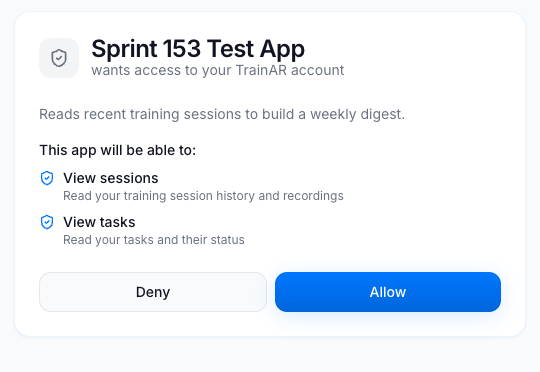
https://yourapp.com/callback?code=AUTH_CODE&state=RANDOM_STATE
Always verify state matches what you sent. The authorization code is single-use and expires in 10 minutes.
3. Exchange the code for tokens
curl -X POST https://api.trainar.ai/v1/oauth-token \
  -H "Content-Type: application/json" \
  -d '{
    "grant_type": "authorization_code",
    "code": "AUTH_CODE",
    "redirect_uri": "https://yourapp.com/callback",
    "client_id": "YOUR_CLIENT_ID",
    "client_secret": "YOUR_CLIENT_SECRET",
    "code_verifier": "YOUR_CODE_VERIFIER"
  }'
Response:
{
  "access_token": "tao_...",
  "refresh_token": "tor_...",
  "token_type": "Bearer",
  "expires_in": 3600,
  "scope": "read:sessions read:tasks"
}
4. Call the API
Use the access token exactly like an API key - it carries the customer's tenant and the granted scopes:
curl https://api.trainar.ai/v1/api-tenant-sessions \
  -H "Authorization: Bearer tao_..."
5. Refresh when the access token expires
Access tokens last 1 hour; refresh tokens last 30 days and rotate on every use (the old refresh token is invalidated).
curl -X POST https://api.trainar.ai/v1/oauth-token \
  -H "Content-Type: application/json" \
  -d '{
    "grant_type": "refresh_token",
    "refresh_token": "tor_...",
    "client_id": "YOUR_CLIENT_ID",
    "client_secret": "YOUR_CLIENT_SECRET"
  }'
6. Revoke (optional)
curl -X POST https://api.trainar.ai/v1/oauth-revoke \
  -H "Content-Type: application/json" \
  -d '{ "token": "tao_...", "client_id": "YOUR_CLIENT_ID", "client_secret": "YOUR_CLIENT_SECRET" }'
A customer can also revoke your app at any time from their dashboard (Settings > API > Connected apps), which immediately invalidates all tokens your app holds for that account.
Scopes
Request only the scopes your integration needs. The customer sees each one in plain English on the consent screen. Available scopes:
read:sessions, write:sessions, read:tasks, write:tasks, read:users, manage:users, read:skills, write:skills, read:knowledge, write:knowledge, read:billing, manage:integrations, manage:devices, manage:webhooks, manage:api_keys, read:forms, manage:forms
A token can only ever hold scopes that are both requested at authorize time AND allowed for your app. Calling an endpoint without its required scope returns 403 INSUFFICIENT_PERMISSIONS.
Error codes
| Error | Meaning |
|---|---|
login_required |
The customer is not signed in to TrainAR (the consent page handles this automatically). |
access_denied |
The customer denied consent, or a development-mode app was opened by a non-owner. |
invalid_client |
Wrong client_id / client_secret. |
invalid_grant |
Bad, expired, or already-used code; PKCE verification failed; or redirect_uri mismatch. |
INSUFFICIENT_PERMISSIONS |
The token lacks the scope the endpoint requires. |
App review
New apps start in development mode and can only connect to your own TrainAR account, so you can build and test end to end immediately. When you are ready to connect real customers, submit the app for review and it moves to active.
Registering your app
You register and manage your apps yourself in the TrainAR dashboard - no need to email us.
- Sign up / sign in at dashboard.trainar.ai. Your TrainAR account doubles as your sandbox: while your app is in development you can connect it to your own account to test end to end.
- Open Developer in the sidebar (you need the Admin role on your account - app credentials are managed at admin level, like API keys) and click Register app. Give it a name, description, homepage, redirect URI(s) and the scopes it needs.
- You receive a client ID and a client secret. The secret is shown once - copy it somewhere safe immediately. You can rotate it later, which issues a new secret and invalidates the old one.
- Build and test against your own account using the authorize flow above (the app detail page gives you a ready-made "test your integration" link).
- When you're ready to connect real customers, click Submit for review. We check the app and either approve it (it goes live and can connect any TrainAR customer) or send it back with notes. You'll get an email either way.
An app in development can only be authorized by your own account, so you can build safely before review. An active app can connect any customer. If an app is ever suspended, its tokens stop working immediately.