
Webhooks
Webhooks let TrainAR push events to a URL you control the moment something happens in your account -- no polling required.
Webhooks let TrainAR push events to a URL you control the moment something happens in your account -- no polling required.
When an event fires, TrainAR makes an HTTP POST to every URL you have subscribed to that event. Your endpoint receives the payload, responds with a 2xx status, and TrainAR marks the delivery as complete.
Events
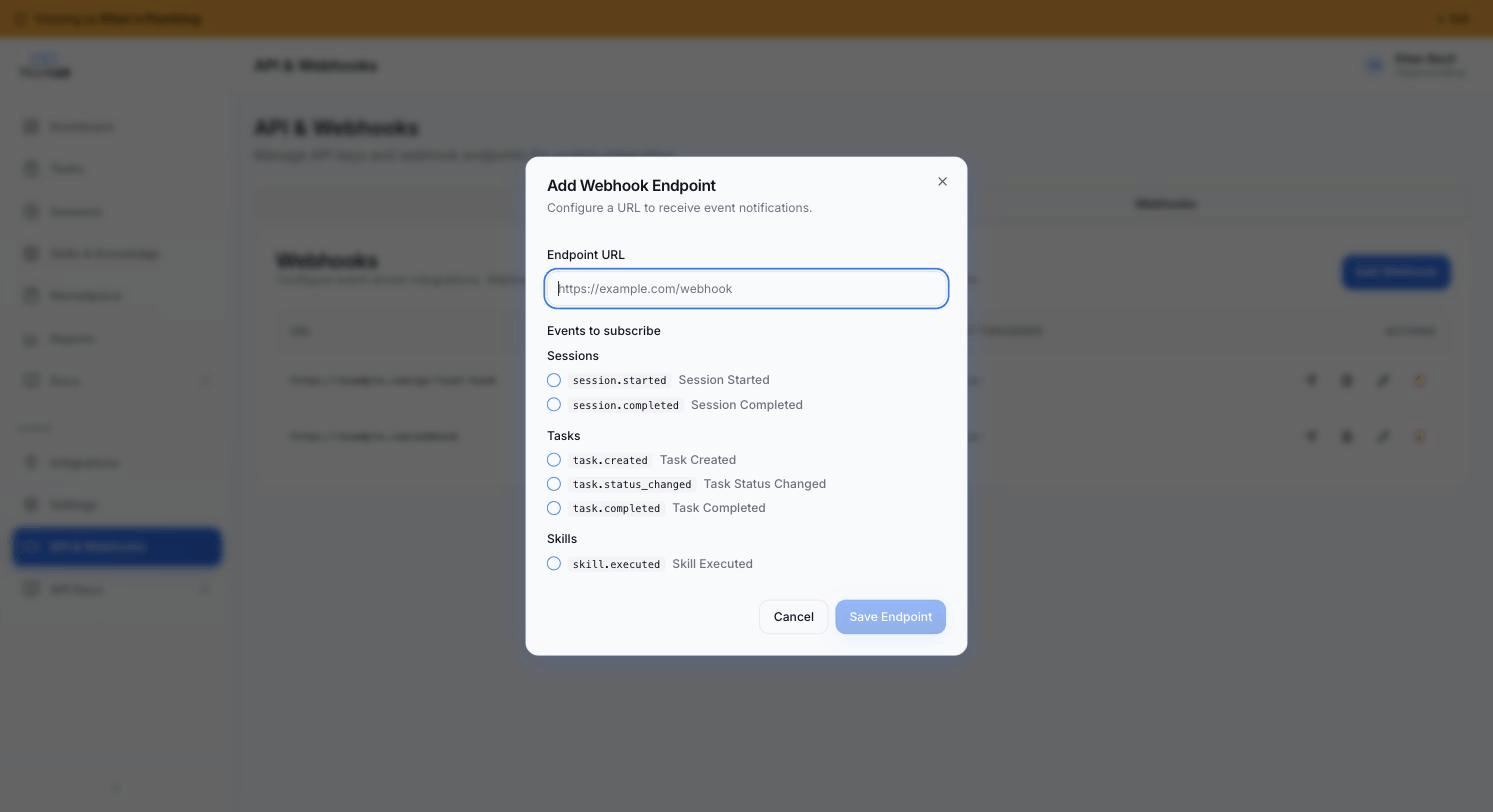
TrainAR fires six event types:
| Event | When it fires |
|---|---|
task.created |
A new task is created -- manually, via API, or by an integration |
task.status_changed |
A task moves between open, in_progress, completed, or cancelled |
task.completed |
A task is marked completed (always fires alongside task.status_changed when completing) |
session.started |
A training session begins on an AR device |
session.completed |
A training session ends -- payload includes duration, video URL, and session summary |
skill.executed |
A skill runs, whether triggered from the device, via the API, or by an agent |
You can subscribe one endpoint to multiple events, or register separate endpoints per event.
Delivery envelope
Every event POST has the same outer structure:
{
  "event": "session.completed",
  "event_id": "evt-a1b2c3d4-...",
  "timestamp": "2026-05-18T10:00:00.000Z",
  "data": { }
}
| Field | Description |
|---|---|
event |
The event type string |
event_id |
Stable UUID-based identifier, prefixed evt-. Identical across retries of the same delivery. |
timestamp |
ISO-8601 UTC timestamp of when the event fired |
data |
Event-specific payload (see below) |
Per-event payload shapes
task.created
{
  "task_id": "uuid",
  "title": "string",
  "status": "open",
  "source": "api | manual | integration",
  "external_id": "string | null",
  "assigned_to": "uuid | null",
  "created_at": "ISO-8601"
}
task.status_changed
{
  "task_id": "uuid",
  "title": "string",
  "previous_status": "open | in_progress | completed | cancelled",
  "new_status": "open | in_progress | completed | cancelled",
  "external_id": "string | null",
  "source": "string",
  "integration": { "integration_id": "uuid", "provider": "string" } | null,
  "session_id": "uuid | null",
  "changed_by": "session | user | integration | api",
  "changed_at": "ISO-8601"
}
task.completed
All fields from task.status_changed, plus:
{
  "completion_source": "session | user | integration | api",
  "completed_at": "ISO-8601",
  "session_summary": { } | null
}
session_summary is populated only when the task was completed by a session (i.e. an engineer finished training linked to this task).
session.started
{
  "session_id": "uuid",
  "user_id": "uuid",
  "user_name": "string",
  "seat_id": "uuid",
  "bundle_name": "string | null",
  "session_name": "string | null",
  "video_url": "string | null",
  "started_at": "ISO-8601"
}
session.completed
{
  "session_id": "uuid",
  "user_id": "uuid",
  "user_name": "string",
  "status": "string",
  "started_at": "ISO-8601",
  "ended_at": "ISO-8601",
  "duration_minutes": 42,
  "minutes_consumed": 42,
  "video_url": "string",
  "task_id": "uuid | null",
  "task_title": "string | null",
  "session_summary": { } | null
}
skill.executed
{
  "execution_id": "uuid",
  "skill_id": "uuid",
  "skill_name": "string",
  "session_id": "uuid | null",
  "user_id": "uuid | null",
  "status": "success | failure",
  "response_target": "string",
  "duration_ms": 1234,
  "executed_at": "ISO-8601"
}
Idempotency
The event_id field is stable across retries. If the same event is delivered more than once (due to a retry after your endpoint returned a non-2xx or timed out), the event_id value will be identical. Store event_id and deduplicate on your side if your handler is not safe to run twice.
HMAC signature verification
Every production endpoint must verify the HMAC signature. Without verification, an attacker who guesses your endpoint URL can spoof events and trigger downstream automations.
Every delivery is signed. Verifying signatures protects against spoofed requests -- only TrainAR, holding the endpoint secret, can produce a valid signature for your endpoint.
Two headers are included on every POST:
| Header | Description |
|---|---|
X-Webhook-Timestamp |
Unix timestamp (seconds, as a string) at the time of dispatch |
X-Webhook-Signature |
HMAC-SHA256 hex digest of "<timestamp>.<raw-body>" signed with the endpoint secret |
The signing string is timestamp + "." + raw_body. The secret is the 64-character hex string returned when you subscribed the endpoint.
Verify in Python
import hmac
import hashlib

def verify_signature(secret: str, timestamp: str, raw_body: bytes, signature: str) -> bool:
    signing_input = f"{timestamp}.".encode() + raw_body
    expected = hmac.new(
        secret.encode(),
        signing_input,
        hashlib.sha256
    ).hexdigest()
    return hmac.compare_digest(expected, signature)

# In your handler:
# timestamp = request.headers["X-Webhook-Timestamp"]
# signature = request.headers["X-Webhook-Signature"]
# body = request.get_data()  # raw bytes before any parsing
# if not verify_signature(ENDPOINT_SECRET, timestamp, body, signature):
#     return Response(status=401)
Verify in Node.js
const crypto = require("crypto");

function verifySignature(secret, timestamp, rawBody, signature) {
  const signingInput = `${timestamp}.${rawBody}`;
  const expected = crypto
    .createHmac("sha256", secret)
    .update(signingInput)
    .digest("hex");
  return crypto.timingSafeEqual(
    Buffer.from(expected, "hex"),
    Buffer.from(signature, "hex")
  );
}

// rawBody must be the raw request body string -- parse JSON *after* verification.
Always read the raw body before parsing JSON. Most frameworks offer a
rawBodyorreq.bodybuffer option -- use that for signature verification, then parse separately.
Replay attack protection
Also reject requests where the X-Webhook-Timestamp is more than five minutes in the past. This prevents an attacker who captured a valid signed request from replaying it later.
Delivery and retry behaviour
- 3 attempts per event. TrainAR retries automatically on failure.
- Retry schedule: Immediate, then approximately 10 seconds (plus random jitter up to 5 seconds), then approximately 60 seconds (plus random jitter up to 5 seconds).
- Per-attempt timeout: 15 seconds. Your endpoint must return a 2xx status within 15 seconds or the attempt is treated as failed.
- Success condition: Any 2xx HTTP status is treated as successful delivery. The response body is not read.
- Failure condition: Any non-2xx status, connection error, or timeout.
After all 3 attempts fail, the delivery is marked failed and the failure count on the endpoint increments. Persistent failures are visible in the Delivery Logs for that endpoint in the Dashboard.
SSRF policy
TrainAR refuses to deliver to URLs that resolve to private IP ranges (RFC 1918: 10.0.0.0/8, 172.16.0.0/12, 192.168.0.0/16), loopback (127.0.0.0/8), or link-local addresses (169.254.0.0/16). Delivery to such URLs is blocked immediately without retrying.
If you need to receive events on a private network, terminate at a public-facing reverse proxy that forwards to your internal service.
Subscribe to events
You have two ways to subscribe: from the Dashboard UI (admins only), or via the API (for automated / agent flows).
Via the Dashboard
Dashboard → API & Webhooks → Webhooks → Add Webhook.
The Add Webhook modal lets you pick an endpoint URL and the events to subscribe to in a single form - same six events as the API.
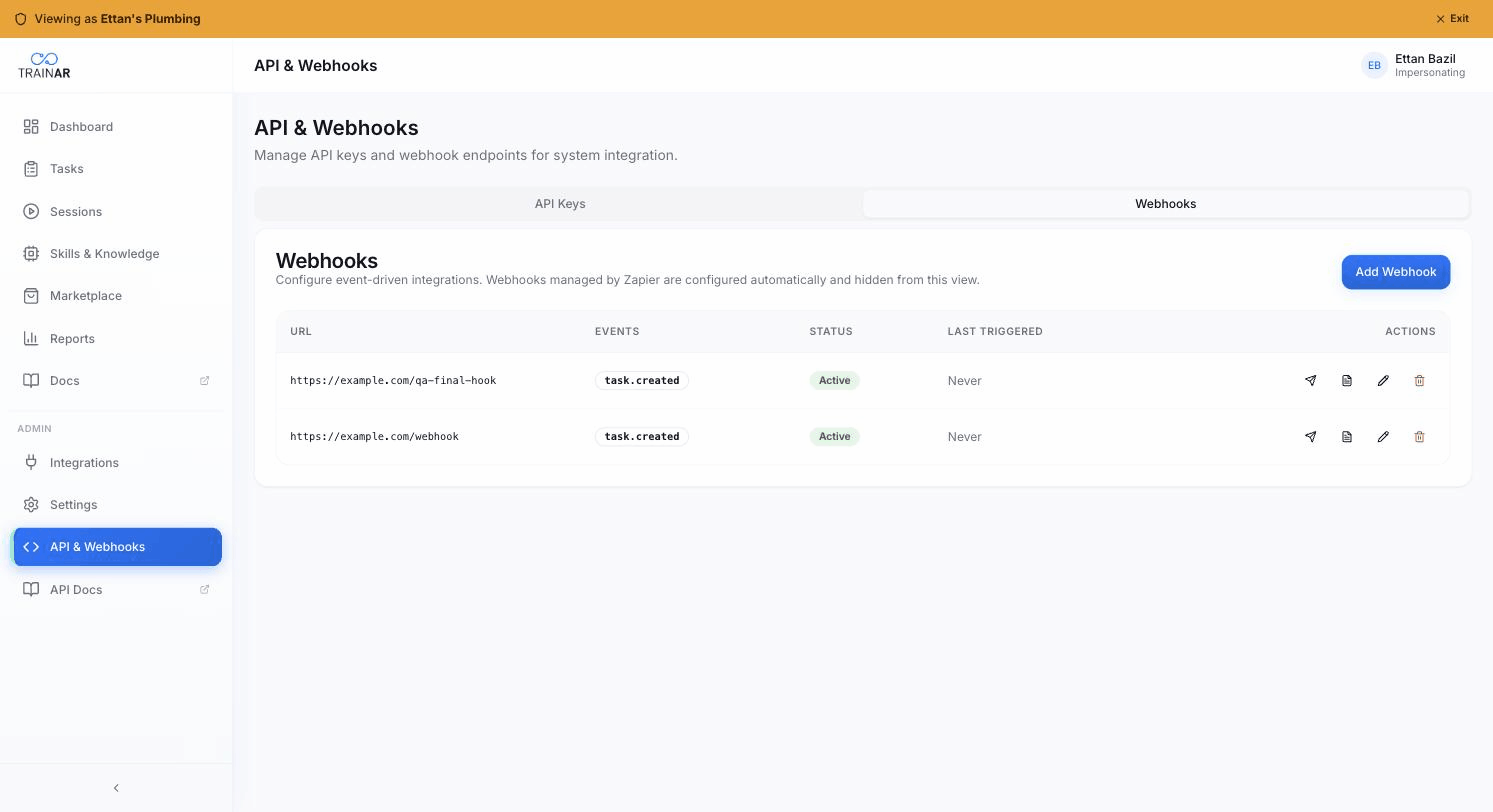
Webhooks managed by Zapier are configured automatically when you connect Zapier and don't show up in this list.
Via the API
Subscribe by calling POST /webhook-subscribe with a tak_* key that has the manage:webhooks scope:
curl -X POST \
  https://api.trainar.ai/v1/webhook-subscribe \
  -H "Authorization: Bearer tak_your_key_here" \
  -H "Content-Type: application/json" \
  -d '{
    "url": "https://your-server.example.com/trainar-events",
    "events": ["session.completed", "task.created"]
  }'
Request body:
| Field | Type | Required | Description |
|---|---|---|---|
url |
string | Yes | Public HTTPS URL to receive POST requests |
events |
string[] | Yes | One or more event type strings |
Response: 201 Created
{
  "id": "endpoint-uuid",
  "events": ["session.completed", "task.created"]
}
The endpoint secret used for HMAC signing is stored internally. It is not returned in the subscribe response. If you need to verify signatures, the secret is available in the Dashboard under the endpoint's details, or you can regenerate a new endpoint.
Note: this behaviour differs from the example in the Build your own page which described the secret being returned at subscribe time -- the current implementation stores it server-side. Verify signatures using the secret shown in the Dashboard for your endpoint.
Check whether an endpoint exists
curl "https://api.trainar.ai/v1/webhook-subscribe?endpoint_id=<uuid>" \
  -H "Authorization: Bearer tak_your_key_here"
Returns { "exists": true, "id": "...", "events": [...], "url": "..." } or { "exists": false }.
Unsubscribe
curl -X DELETE \
  "https://api.trainar.ai/v1/webhook-subscribe?endpoint_id=<uuid>" \
  -H "Authorization: Bearer tak_your_key_here"
Returns { "success": true } on success, 404 if the endpoint is not found.
Manage endpoints in the Dashboard
Dashboard → Settings → API & Webhooks → Webhooks shows all your registered endpoints with their subscribed events, last triggered time, and failure count. From this view you can:
- Add a new endpoint (same as the API subscribe call).
- Edit an endpoint's URL or event list.
- View the delivery log for an endpoint, including the payload sent and the response received.
- Retry a failed delivery manually.
- Delete an endpoint.
Zapier-managed endpoints are created and removed automatically by Zapier's OAuth flow and do not appear in this list.
Next steps
- TrainAR REST API reference -- create tasks and invite users programmatically.
- n8n integration -- if you are using n8n, the community node handles webhook subscription automatically.
- TrainAR MCP server -- manage webhooks and subscriptions through an AI agent.